


The modern wedding experience, meticulously planned and beautifully executed, often generates a treasure trove of spontaneous, unscripted moments that professional photographers, despite their unparalleled skill, cannot always capture. These invaluable snapshots – a cousin’s hilarious dance move at midnight, a grandmother’s joyful reaction to a sparkler send-off, or candid interactions between guests – are frequently lost within the digital confines of individual smartphone galleries. Recognizing this pervasive challenge, a burgeoning market of wedding photo sharing applications has emerged, offering couples a streamlined solution: a single, centralized platform to consolidate every guest-taken photo and video into an album they fully own and control.
The Evolution of Wedding Photography and Guest Engagement
For decades, couples relied almost exclusively on professional photographers and videographers to document their special day. Guest contributions, if any, were often limited to disposable cameras or personal film rolls, which required development and often resulted in delayed or lost memories. The advent of digital photography and, more significantly, the ubiquitous smartphone, fundamentally transformed this dynamic. Today, virtually every wedding guest arrives with a high-resolution camera in their pocket, capable of capturing hundreds of images and videos. This technological shift created both an opportunity and a problem: an unprecedented volume of potential memories, yet no easy, collective way to gather them.
Initially, couples resorted to creating shared cloud folders or encouraging the use of specific hashtags on social media. While hashtags provided a public stream, they often lacked privacy, organization, and the ability to collect original high-resolution files. Cloud folders, on the other hand, presented friction points for guests, often requiring account creation or app downloads, thus hindering participation, especially among older demographics. This gap in the market paved the way for dedicated wedding photo sharing applications, designed specifically to address these challenges with user-friendliness and accessibility at their core. The category has seen exponential growth in recent years, reflecting a broader trend towards personalized digital content and communal memory-making in the experience economy.
Understanding the Mechanics: How Wedding Photo Sharing Apps Operate
Despite a multitude of providers, the operational mechanics of the best wedding photo sharing apps adhere to a consistent, four-step process, engineered for maximum guest participation and minimal effort.

- Album Creation and QR Code Generation: The couple initiates the process by creating a digital album or gallery within their chosen platform. The system then automatically generates a unique QR code specifically linked to this album. This QR code acts as the universal gateway for guests to contribute.
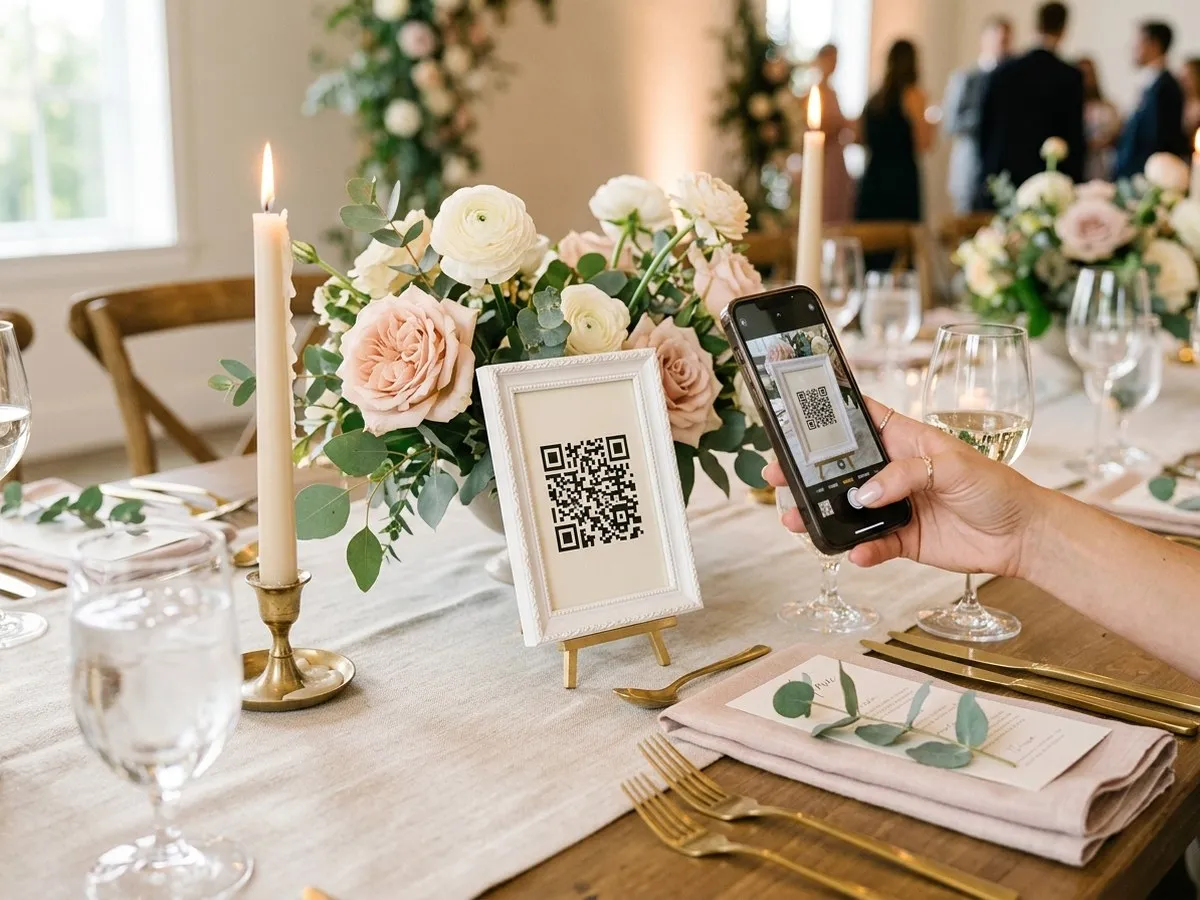
- Strategic Placement of QR Codes: To ensure visibility and encourage interaction, couples are advised to strategically display these QR codes throughout their wedding venue. Common placements include small, framed signs on each reception table, near the bar, at the entrance, or within designated photo booth areas. The goal is to make the code impossible to miss during moments when guests are naturally inclined to use their phones.
- Guest Access via Phone Camera: Guests simply use their smartphone camera to scan the QR code. This action automatically opens a dedicated web page within their phone’s browser, eliminating the need for any app download. This "no download, no account" approach is a critical design philosophy, as industry data suggests that requiring an app installation drastically reduces guest engagement, particularly among older or less tech-savvy attendees.
- Effortless Upload and Consolidation: Once on the web page, guests can easily select photos and videos from their phone’s gallery and tap an "upload" button. The chosen media then seamlessly transfers into the couple’s centralized digital gallery, ensuring that every captured memory is funneled into a single, organized collection.
The emphasis on browser-based functionality is paramount. As WeddingSnap aptly states, "Nothing to install, nothing for guests to sign up for." This simplicity is the cornerstone of successful guest participation, recognizing that a wedding reception is a celebratory environment, not an IT support desk.
A Growing Market: Navigating the Landscape of Photo Sharing Solutions
The rapid expansion of the wedding photo sharing app market has led to a proliferation of tools that, on the surface, appear strikingly similar. However, beneath the polished interfaces lie significant variations in pricing models, feature sets, and underlying limitations that demand careful scrutiny from budget-savvy couples. Prices range from entirely free to approximately eighty dollars for a one-time purchase. The term "unlimited" often carries different definitions across providers, and crucial restrictions related to storage, gallery duration, or upload caps can be buried deep within terms and conditions.
This guide aims to cut through the marketing noise, providing a factual comparison of the real options based on what truly impacts a couple’s experience and budget. It identifies which solutions are best suited for different wedding sizes and preferences, whether the need is for a robust platform catering to a 200-person reception or the most economical option for a more intimate gathering.
Key Criteria for Evaluating Wedding Photo Sharing Apps
To make an informed decision, couples should evaluate apps against several critical factors that influence both cost and usability. This analysis is based on vendor pricing pages, verified between late September and mid-October 2026, though prices and tiers are subject to change and should always be re-confirmed before purchase.
- Pricing Structure: Is it a one-time fee or a subscription? Are there per-guest fees? Are there different tiers based on features or guest count? Understanding the total cost without hidden charges is crucial.
- Upload Limits: Does the service impose caps on the number of photos or videos guests can upload? Are videos included, and if so, do they count towards photo limits or have separate restrictions? "Unlimited" often has caveats.
- Gallery Window & Storage Duration: For how long after the wedding can guests upload photos? How long will the final gallery be hosted and accessible for viewing and downloading? Some services differentiate between upload window and hosting duration.
- Host Approval/Moderation: Can the couple review and approve photos and videos before they become visible in the main gallery? This feature is vital for maintaining control over content and ensuring appropriateness.
- Ease of Guest Use: Beyond the "no download" aspect, how intuitive is the upload interface? Are there any unexpected steps that might deter guests?
- Data Ownership and Download Options: Who owns the uploaded content? Can the couple easily download all original, high-resolution files without restrictions? This is critical for long-term preservation.
- Customization and Branding: Are there options to personalize the gallery with wedding colors, names, or dates? Can QR code signs be customized?
- Support and Guarantees: What kind of customer support is available? Are there money-back guarantees or free trial periods?
Comprehensive Comparison of Leading Wedding Photo Sharing Apps

The market offers a range of compelling options, each with distinct advantages. Below is a detailed comparison of prominent platforms, highlighting their strengths for various wedding scenarios. Notably, all featured apps operate browser-based, eliminating guest app downloads.
| App | Free Option | Paid Price | Uploads | Gallery Window | Host Approval |
|---|---|---|---|---|---|
| WedUploader | Yes, the whole product | Premium tier (price not public) | Unlimited, into your own Google Drive | No expiration | Not documented |
| Wedibox | First 50 guest uploads | $49 one time | Unlimited on premium | As long as gallery open | Yes |
| WeddingSnap | No, 30-day money-back guarantee | $39.99 one time | Unlimited photos and video | 12 months after wedding | Not documented |
| Candid Cam | Yes, 50 uploads, no video | $35 Social, $69 Plus | 200 (Social), 500 (Plus); video limits | Uploads 30 days, hosted until deleted | Yes, review before album |
| hazel | Up to 6 guests, 30 photos each | From $8.99 (20 guests) to $64.99 (200 guests) | Up to 30 photos/guest; unlimited photos add-on | Uploads open 1 week, 1 year storage | Yes, guests check, host picks |
| GUESTPIX | Demo, 50 photos, 30-day window | Classic, Signature, Bundle tiers | Unlimited photos and video | 3 or 12 month upload, 12 month hosting | Yes, from dashboard |
| VowSnaps | Try 10 uploads before paying | $79.99 one time | Up to 2,000 photos and videos | 12 month upload window | Yes, approval-first |
Editor’s Pick & Overall Value: WeddingSnap
For couples seeking a budget-friendly tool that prioritizes guest ease-of-use and offers comprehensive media collection, WeddingSnap stands out. Priced at a one-time fee of $39.99, it eliminates subscriptions and per-guest charges. Its core appeal lies in its simplicity: guests scan a QR code and can upload unlimited photos, videos, and even voice messages directly from their phone, all without needing to download an application. This innovative inclusion of voice messages transforms the gallery into a digital guest book, complementing traditional guest book alternatives. The gallery remains live for a full year, providing ample time for couples to download all content and preserve it indefinitely. Setup is quick, taking approximately two minutes, and printable QR templates are included. A 30-day money-back guarantee offers peace of mind. For Budget Savvy Bride readers, a 10% discount is available via their deal page. WeddingSnap’s robust feature set for a competitive one-time price, coupled with its unique voice message capability, makes it a strong contender for the Editor’s Pick.
(Paid placement: WeddingSnap paid for the Editor’s Pick spot. Its pricing and limits come from its public site, the same way we checked every other tool in this post.)
The Truly Free Solution: WedUploader
For couples operating with the strictest budget, WedUploader represents a genuinely free, full-featured option rather than a limited trial. It offers unlimited albums and uploads, ensuring original photo and video quality, and crucially, all files are directed straight into the couple’s own Google Drive rather than being stored on a vendor’s server. Given that Google’s free tier provides 15 GB of storage, this capacity is often sufficient for most weddings, negating the need for any payment. Albums on WedUploader never expire, providing indefinite access to memories. The primary trade-off is in user interface polish; while functional, it lacks the designed gallery aesthetic of paid alternatives, and content moderation features are not explicitly documented. WedUploader has been a long-standing recommendation for its cost-effectiveness and direct cloud integration.
Prioritizing Privacy and Moderation: Candid Cam and VowSnaps

For couples who prioritize control over the content shared in their public or private galleries, apps offering pre-approval features are essential. Candid Cam has built its entire product around this gatekeeping functionality, explicitly stating, "You review uploads privately and choose what goes into the album." This feature is invaluable for those who wish to curate their collection, preventing unflattering or inappropriate candids from appearing without prior consent. Candid Cam offers plans at $35 for "Social" and $69 for "Plus," with a free QR sign maker available even before purchase.
VowSnaps provides similar moderation capabilities with its "automatic posting or approval-first moderation" setting, offering flexibility as a core feature rather than the sole concept. Priced at $79.99 for a one-time purchase, it allows for up to 2,000 photos and videos with a 12-month upload window, further supported by a 14-day money-back guarantee. Both services address the growing concern among couples about digital privacy and content control.
Tailored for Guest Count and Budget: hazel
Unlike many flat-fee services, hazel offers a pricing model that scales with the number of invited guests, making it particularly attractive for smaller weddings. Prices range from $8.99 for up to 20 guests, to $64.99 for 200 guests, paid as a one-time fee without a subscription. This ensures that couples hosting intimate gatherings are not overpaying for capacity they don’t need. Video clips are included at every tier. Guests can join via a link, email invite, or QR code, again with no app download required.
hazel also implements a dual-layer approval system: guests can review each photo before uploading, and post-wedding, the couple selects the final album content. Customization options are robust, including printable QR signs with personalized names and dates, available in over 20 designs and multiple color schemes, along with table cards and wedding bingo templates. While a free tier covers up to 6 guests, it serves primarily as a test run. Uploads can remain open for up to a week after the wedding, with the album stored for a year. Unlimited photos are available as a small add-on from $6.49. Readers can avail a 10% discount on their first event through a specific deal link.
Designed for Large Celebrations: GUESTPIX and Wedibox
For large weddings where hundreds of guests are expected to upload content, capacity caps become a significant concern. GUESTPIX addresses this by including "Unlimited Photos & Videos" and "Unlimited Guests & Co-Hosts" across all its tiers (Classic, Signature, Bundle). Similarly, Wedibox’s premium tier, available for a flat $49 after the initial free 50 uploads, unlocks unlimited uploads.

Couples considering GUESTPIX should note its two distinct timing options: the Classic tier offers a 3-month upload window and 12 months of hosting, while the Signature tier extends both to 12 months. GUESTPIX also provides over 180 editable Canva templates for signs, making customization straightforward. Wedibox, known for its straightforward setup, also ensures the gallery remains open as long as the couple desires. Both services are designed to handle the high volume of content generated by large guest lists without punitive overage charges.
Best Budget Paid Pick: Candid Cam (Social Tier)
If a couple desires a professionally designed gallery with essential moderation features and a flat, predictable price that isn’t tied to guest count (unless choosing hazel for smaller weddings), Candid Cam’s "Social" tier at $35 is the lowest entry point in this category. It covers 200 uploads, with up to 60 of those being video, which is ample for a smaller wedding but might be tight for larger events. For increased capacity, the "Plus" tier at $69 offers 500 uploads and 150 videos. WeddingSnap, at $39.99, presents a strong alternative, offering unlimited video and a longer hosting window, making a side-by-side comparison between these two critical. For weddings with 60 or fewer guests, hazel offers even lower price points (e.g., $19.99 for 40 guests, $25.99 for 60 guests), including video and up to 30 photos per guest.
Unpacking "Free": A Deeper Dive into Tier Structures
The term "free" within this category can be misleading, encompassing four distinct models:
- Genuinely Free: WedUploader epitomizes this, offering unlimited albums, uploads in original quality, no expiration, and storage directly in the user’s Google Drive, completely free of charge and without hidden catches.
- Free Up to a Cap: Several services provide a limited free tier. Wedibox offers the "first 50 guest uploads" at no cost. Candid Cam matches this with 50 uploads, though without video support and with the gallery expiring after 30 days. hazel provides a free option for up to 6 guests, allowing up to 30 photos each. These capped tiers are generally suitable for testing the service rather than for full wedding coverage, as 50 uploads can easily be reached by just a handful of enthusiastic guests.
- Free Demo: GUESTPIX offers a demo that includes 50 photos and a 30-day upload window, requiring no credit card details. VowSnaps allows users to "try 10 photos or videos before paying." These are designed to showcase functionality before commitment.
- Not Free, But Refundable: WeddingSnap operates without a free tier but provides a 30-day money-back guarantee, allowing users to experience the full product with the option of a refund if unsatisfied. VowSnaps adds a 14-day guarantee on top of its trial period.
A critical aspect to verify, regardless of the "free" model, is the distinction between the upload period and the hosting period. Some services allow uploads for a shorter duration than the gallery remains live, meaning photos might stop arriving months before the gallery closes. It is always advisable to download original files as soon as the main upload activity subsides, ensuring a personal backup.
Cost Analysis: What to Expect for a 100-Guest Wedding

For a wedding with approximately 100 guests, decent participation typically translates to several hundred photo and video uploads. This volume usually exceeds the caps of most "free trial" tiers, making either a genuinely free tool with personal storage or a flat-fee paid option the most viable choices.
- WedUploader: Effectively free, utilizing the user’s existing Google Drive storage.
- WeddingSnap: $39.99 (one-time fee).
- Wedibox: $49 (one-time fee).
- Candid Cam: $35 (Social tier) or $69 (Plus tier).
- hazel: $38.99 for 100 guests (one-time fee).
- GUESTPIX: Varies by tier, but typically within the $50-$80 range for comparable features.
- VowSnaps: $79.99 (one-time fee).
No service in this primary group charges on a per-guest basis, although hazel’s pricing scales by guest-count bands, it remains a single, upfront payment. Crucially, none of these are subscriptions requiring cancellation. When viewed against the overall wedding budget, a one-time charge under fifty dollars for a comprehensive collection of guest-generated memories represents exceptional value.
Critical Questions for Prospective Users
Before committing to any wedding photo sharing app, couples should pose the following questions to the vendor, ensuring clear and unambiguous answers:
- What is the total cost, including any hidden fees or upsells?
- What are the exact limits on uploads (number of photos, videos, file size)?
- How long does the gallery remain active for guests to upload photos?
- How long is the final gallery hosted and accessible for viewing and downloading?
- What options are available for host moderation or content approval?
- How can I download all original, high-resolution photos and videos?
- What data privacy policies are in place regarding guest photos and personal information?
- Is customer support available, and what are the typical response times?
- Are there any branding restrictions or requirements for the gallery?
- What happens to the gallery and its contents after the hosting period expires?
If a vendor is unable to provide clear and concise answers to questions concerning upload limits, data ownership, or post-expiration policies, it is advisable to explore alternative options.
Maximizing Guest Participation: Strategies for Effective Photo Collection
The most sophisticated photo sharing app is ineffective if guests are unaware of its existence or are reluctant to use it. Adoption hinges on a combination of strategic signage and timely announcements.

The key to successful engagement is visibility. Instead of a single QR code at the entrance, distribute small, framed signs on every reception table. Place additional signs near the bar, photo booth areas, and guest book table – locations where guests are already likely to have their phones out. Most apps provide printable sign templates, and some, like GUESTPIX, even offer extensive editable Canva templates, minimizing design effort for couples.
A brief, well-timed announcement from the DJ or MC can significantly boost participation. The ideal moment is typically after dinner, when guests are relaxed but before the dancing becomes too intense. A single, clear sentence explaining the purpose and ease of use is usually sufficient.
Furthermore, integrate the gallery link onto the couple’s wedding website. This provides a fallback for guests who missed the signs or announcements, allowing them to upload photos retrospectively. Pairing the QR code with a unique wedding hashtag on the same sign reinforces both habits. Incorporating a minute for this announcement into the wedding day timeline ensures it isn’t overlooked amidst the day’s events.
The Indispensable Role of Professional Photographers
It is crucial to reiterate that guest photo sharing apps serve as a supplementary tool, not a replacement for professional wedding photography. Professional photographers offer a level of artistry, technical expertise, and storytelling that guest contributions simply cannot replicate. They work with professional-grade equipment, understand lighting, composition, and flow, and are dedicated to capturing critical moments from optimal vantage points. They anticipate key events, direct group shots, and provide a curated, high-quality visual narrative of the day.
What guest galleries excel at is providing an authentic, unvarnished "other side" of the wedding day. These are the candid reception table interactions, the playful moments of children under the dessert table, or heartfelt goodbyes in the parking lot – moments where a professional photographer physically cannot be. Guest photos fill in the gaps, offering a rich tapestry of memories that complements, rather than competes with, professional artistry. They provide a deeper, more personal insight into the guest experience, often capturing raw emotions and spontaneous joy that adds immeasurable value to the overall wedding album. By viewing these apps as coverage for the moments a professional might miss, couples can maximize the capture of their special day.
Data Security and Privacy Considerations

In an era of heightened digital awareness, understanding the data security and privacy protocols of a photo sharing app is paramount. Couples should inquire about:
- Data Encryption: Are uploads and stored photos encrypted to protect against unauthorized access?
- Server Locations: Where are the photos stored geographically, and what data protection laws apply?
- Third-Party Sharing: Does the vendor share data with any third parties, and for what purposes?
- Deletion Policies: What happens to the data if the couple decides to delete their gallery or close their account?
- GDPR/CCPA Compliance: Does the service comply with relevant data protection regulations if guests are from affected regions?
Ensuring that guest photos and personal information are handled with the utmost care and transparency is a critical responsibility for couples.
Conclusion: Preserving Every Precious Memory
The best wedding photo sharing apps all deliver on the core promise of consolidating guest-generated content. The ultimate choice hinges on a couple’s specific priorities: budget, moderation needs, video emphasis, or guest count. For those seeking a truly free solution, WedUploader offers direct integration with Google Drive. Couples desiring a curated gallery with pre-approval capabilities will find Candid Cam’s $35 entry point compelling. If unlimited video and a robust feature set for a flat fee are paramount, WeddingSnap at $39.99 presents a strong option. Any of these choices vastly superior to the alternative: invaluable memories scattered across dozens of individual camera rolls, potentially lost forever.
Regardless of the chosen platform, proactive engagement is key. Print clear signs, enlist the MC’s support for an announcement, and download original files promptly to ensure long-term preservation. These digital keepsakes can then be transformed into tangible memories, whether through custom photo albums, digital frames, or other unique keepsakes, ensuring that every laugh, dance, and heartfelt moment from the wedding day is cherished for years to come.
Frequently Asked Questions
Do I need an app for guests to upload wedding photos?
No. All leading tools in this guide operate via a web browser after a simple QR code scan, requiring no app installation or account creation from guests.

Is there a free wedding photo sharing app?
Yes. WedUploader is genuinely free and uploads directly to your Google Drive. Other services like Wedibox offer a free tier for the first 50 uploads, hazel for up to 6 guests, and GUESTPIX and VowSnaps provide limited free trials.
How long do the photos stay online?
This varies significantly by provider. WeddingSnap keeps galleries live for a year after the wedding. GUESTPIX offers a 3 or 12-month upload window paired with 12 months of hosting. Wedibox allows galleries to remain open as long as desired. hazel includes a year of storage, and WedUploader albums in your own Google Drive never expire. Always confirm both the upload and hosting durations.
Can we approve photos before guests see them?
Yes, several tools offer this crucial feature. Candid Cam is designed around private review and approval. hazel allows guests to check each photo before upload and gives the couple final album selection. VowSnaps includes an "approval-first moderation" setting. Wedibox and GUESTPIX also provide moderation controls from the host dashboard.
Can guests upload videos?
Yes, video upload is a standard feature across most platforms, though terms may differ. WeddingSnap and GUESTPIX advertise unlimited photos and video uploads. VowSnaps counts videos towards its overall 2,000 upload limit, while hazel includes video clips at every guest count tier.